I have lost the ability to edit an existing data source or create new reports using any data source, including trying to connect to the enterprise system with existing universes that work with the web-based WebI.
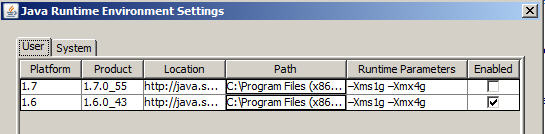
I’m using the WebI Rich Client, v 14.0.4 Build 738. Windows 7, running Java 1.6.0_43 in 32-bit. (I’ve tried enabling and disabling combinations with Java 1.7.0_55.)
Previously, I was able to use an xls/csv file as a data source, edit the report, edit the data source, and create new documents. Now, I’m only able to refresh the data from the existing data sources in previously created old reports. I cannot build new reports as I cannot access the data sources. The “loading data” screen locks after selecting the source and when allowed, just “loads” for several hours at a time, never leading to the query-build screen.
My system administrator said this was related to the Java version, needing version 1.6. I uninstalled Java 1.7.0_55 and re-installed 1.6.0_43. I’ve also made the memory changes as suggested at runtime to Xms1g Xmx4g. I’ve completely uninstalled and re-installed the WEbIclient two times, still to no avail.
Does the Java Security Certificate that “expired” in Sept 2013 have anything to do with this?
Our installation was largely done by an outside consulting group and I’ve lost faith in an unresponsive system admin to help resolve this.
No, I did not. This is the last version that we’ve been given access to download from our corporate pubshare. As an “end-user,” we’ve not been granted access to the SAP site for any patches or fixes.
I’ll inquire further.
Thank you for the information. It is much appreciated.
Would you happen to know if there has been stabilization with later versions of Java?
(This is so frustrating…having once been on the BI development side and now working as a business end-user, it seems that we are left on an island.)
FYI as far as the version, according to the sys admin, "Rich Client application versions are matched to the SAP Server versions. You cannot run newer/older versions than the release thats installed on the server. "
Problem: Using the WebI Rich Client 14.0.04, I could no longer edit existing report queries, change data sources, or create new reports. The “loading” screen would stay open indefinitely when trying to edit or create new reports or edit data sources or queries. (Web Intelligence Desktop, 14.0.4, Build 738)
This issue has been solved. Here is a detailed response to share the solution, in hopes that if I save one person the lost time and frustration I experienced of this issue, it will have been worth it. This issue was solved with the support of a co-worker who had the same problem and randomly stumbled upon it.
Essentially, this was not a programmatic error in the sense that the WebI Rich Client no longer worked. However, the workings of the WebI Rich Client would “move” the Query Editor to another screen in a dual-monitor set-up.
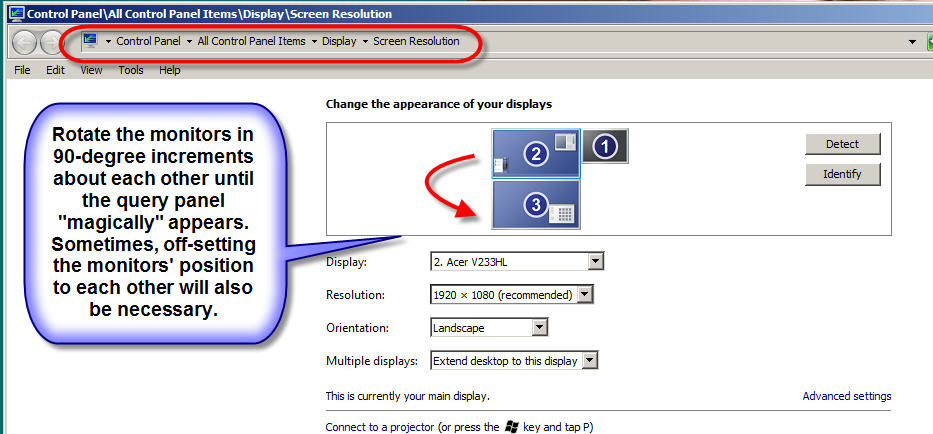
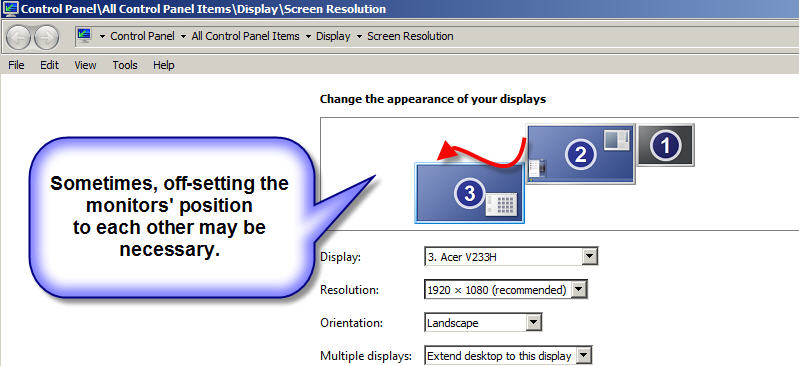
The solution was to rotate the multiple displays in relation to each other or to offset the displays (not in alignment–see attached screenshots) in the Control Panel/Screen Resolution applet. This allowed the “missing” query editor screen to be found often hanging out on another display and/or sometimes spanning multiple displays. (Windows 7)
The query editor was then moved back to the same screen as the report designer and the report was saved. The preferred display settings in the Control Panel applet were restored. The next time the report was opened, the editor was in the proper position when activated.
 (BOB member since 2006-07-06)
 (BOB member since 2002-06-20)
 (BOB member since 2006-07-06)