We are using xi 4.3 webi .it is a FHS report where we have a runtime prompt. The date is selected at runtime from bo calendar. It displays the date correctly dd-mm-yyyy at our end but at the client side it displays as mm-dd-yyyy . So if we select 1st July 2025 at our end ,then it becomes 7th Jan at client side. When running the report the datetime appears as 7/1/2025 12:00:00 AM but on the client’s system it appears as 01/07/2025 00:00:00.
It may be that the user’s have a different locale configured.
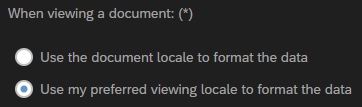
This is under the User settings in the BI Launchpad.
You might need to check on this.
1 Like
Thanks John, it started working correctly on it’s own now for one of our clients. We need to check for others as well. It’s not clear as to what exactly caused this problem.
This is also dependent on the user preferences.

The attached user preferences ensures dd/mm/YYYY formats for prompts
1 Like
This problem seems to be specific to XI 4.3 sp1webi and Chrome browser because nothing would resolve this issue on Chrome. However, it works correctly when the client uses Edge, without the Browser settings. Is this a bug?