In my data provider in WEBI i have the following data on a detailed level.
Account, Month, Amount. All values are dimensions.
What I Want to do in WEBI is the following.
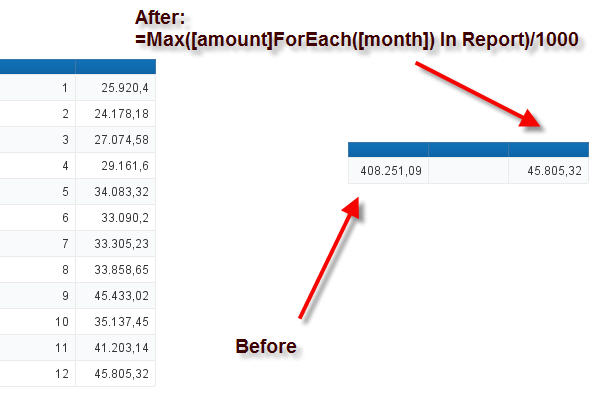
Sum Amount on Month in a WEBI variable. Which I afterwords would like to use MAX on and always want to be 100% sure to get the max amount for a given month and not the total sum amount of all the months like I get now.
From this data the correct when using max on a blank cell should be 10000, but instead I get 12756 which is the total sum and not the max value of the Months.
So my question is what function in WEBI should I use to build my WEBI variable correct?
I have tried with ForAll, Foreach and made IF THEN ELSE statements without luck.
This only works if i have the month dimension next to this variable. But if i use it on its own blank cell it will sum all amount for all months. I just want the max amount for a given month.
How should I use the in report formula isn’t my in([month]) enough?
Now I want to add an where statement to my max function.
Something like this:
Where([month] <= 6)
This is my current function:
=Max([amount]ForEach([month]) In Report Where([month] <= 6))/1000
How do I add it to my previews function without breaking to foreach part of the function. Because if i add an where statement to the solution it will sum all the values together that are under month 6. What I want is to get the max amount in that period witch my where statement is restricting me to.
This works on an Account level but not on a Yearly level because it gets the max amount from Account instead of getting max Amount pr month on a Yearly level.
But if i want to see this variable on a yearly level it gives the max value from the Account that had the biggest amount on a yearly value instead of giving me the max total amount for that year from the month with the highest amount.
On a Account level the max amount will the values from month 5. On a Yearly level the formula you gave returns 54 but the results should have benne 170 Because the sum of month 5 is the max amount and on yearly level that should be 170 from this example.
Nop didn’t change anything. It the same as before.
But if i do this I get something interesting.
Now it will work on yearly and account level but not on Total yearly level without accounts or on total level where it should sum up all the max values pr year. In steed it just returns the max value in total in the period.
May this can help you figure out what I am missing and how to do it right.
But lets try again with the an explanation of what I want to achieve.
I have the following values that I want my measure to be compatible with the following dimensions (Year, Month, Account).
The measure should be able to aggregate on those 3 dimensions and also on a total level without the 3 dimensions.
And now I want to use an other function instead of the Max() function. Lets use the Last() function.
So the differences with this function instead of Max() is that I now want to get the last amount from the last month in a Year on a Account level, but also be compatible on Yearly level were all last amount in the Year should be aggregated.
From what we have done previews the formula could look like this, but this is not working, so from what I want to achieve which I now have explained in words above.
Hop someone can help in this regards.
Edit 1:
After reading the link from the last post I think that the right solution should be something like this. I am trying to run a test of this as we speak.
Edit 2:
This didn’t work.
This is my current findings.
This formula works on a yearly level only and will give the yearly results even when adding accounts to the block.
This works on a yearly level with the Account in the block.
So I am close but not yet there. How to get it to work like my description above?
I am trying to get the accumulated sum of the max values in subticket for each Ticket. At a quick look, this should be able to give me a value of 7 + 5 + 4 + 3 = 19.
My formula currently reads like this, or some many many variations of this.
Running the formula without the output context does not change the result; I get 7 each time. If I leave off the higher context (Ticket) then I just get the grand total.
Can any insight be offered my way on this? I would appreciate it greatly. Thanks.
 (BOB member since 2005-01-06)
 (BOB member since 2005-01-06)