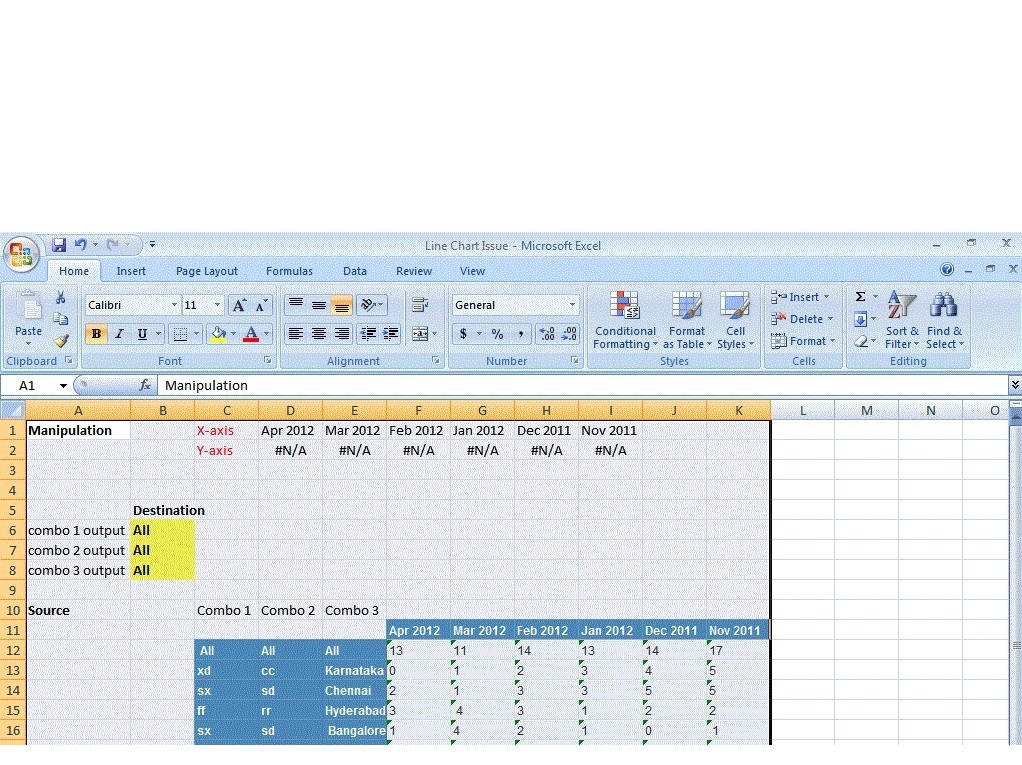
I have attached an excel file , here i have an issue on writing formula for data manipulation part based on the report. Whatever u see in this excel exactly appears in xcelsius dashboard excel file. So can you fix this issue and revert me asap, the problem is writing an index match func doesnot returning me the value. pls open with excel as in the attached file
Another reqd is using India Map by state wise alert color based on the sales target values. Iam using BO 4.O there is no option for using India map Component, Can you guys help me on this rqd too i need this India Map component with the similar scenario
Here how I usually manage the use of index and match in Xcelsius. In attachment, you’ll find a scrapbook of how it can be done. There is probably other way to make it more scalable, but for the purpose of your query, it should be enough.
For the India Map, unforttunately, for dashboard 4, the component does not exist (yet!). It was there in Xcelsius 2008 SP5, but it is gone again
Anyway, unless you have or know people who can create a component from scratch, you must rely to third party add-on like Savvy tools or Innovista.
Sorry for the late response. It really helped. Thanks.
Now i have an scenario which we three columns and one row in a cross tab means row increase dynamically in a horizontal fashion and column so in vertical fashion. Consider this scenario say eg:
Can you kindly provide an formula for this above ‘?’ . Also this State, City, Town is my combo box too based on filtering label items, my line chart displays data for the above 5 months.
I need 3 Combo scenario in cross tab table as 3 columns like above and extract data based out of one dynamic row. This combo should include All Lbel item scenario too…How to write a formula or if you have any sample xlf file like the scenario i specified would be really great.

 (BOB member since 2002-06-20)