I am using a table
which has a column having XML files as individual row content.
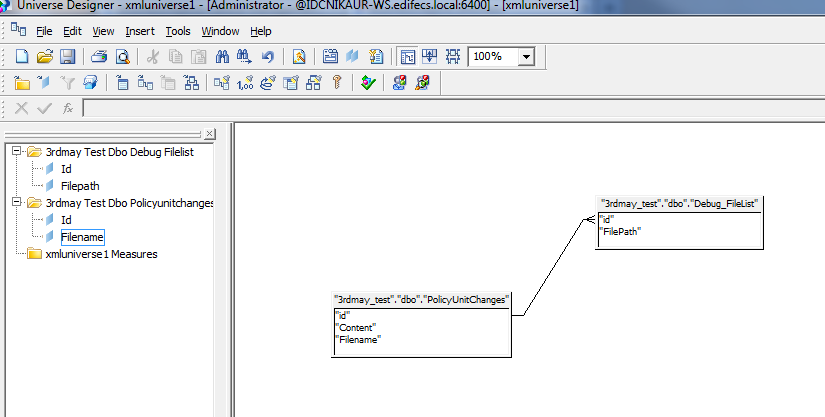
In universe this column is not visible on the left pane under the table name but is visible in the table diagram in right pane.
I am attaching the snapshot of the universe view of table named “3rdmay Test Dbo Policyunitchanges” ,this has colum named “Content”—which has xml files
Any idea of the possible issue ,obliged for the help.
nidhibakshi (BOB member since 2012-05-08)
I don’t see your screenshot.
But I expect your XML column is stored in the database as a CLOB. Designer won’t automatically create objects for CLOBs, although it should allow you to manually create it.
Joe
joepeters  (BOB member since 2002-08-29)
screenshot
nidhibakshi (BOB member since 2012-05-08)
above is the screenshot for the table
“3rdmay_test_dbo_PolicyUnitChanges”
In this when you will look in the right pane u will see it has a column named “Content” (this column contains the xml files)
but for the same table in the left pane this column is missing
nidhibakshi (BOB member since 2012-05-08)
As Joe said, you will have to manually create the object. Drag-and-drop won’t work.
Debbie
Debbie  (BOB member since 2005-03-01)
After i created an object for the xml column “Content” ,what data type should i specify as
there is no option for xml data,
and if i specify other data types such as----“character ,long text”
they give error during query execution—
"the database error text is :(cs)“non supported datatype”.(WIS 10901) "
nidhibakshi (BOB member since 2012-05-08)