I posted this in “Security and User Administrastion ==> CMC” but didn’t get any replies but 128 views.
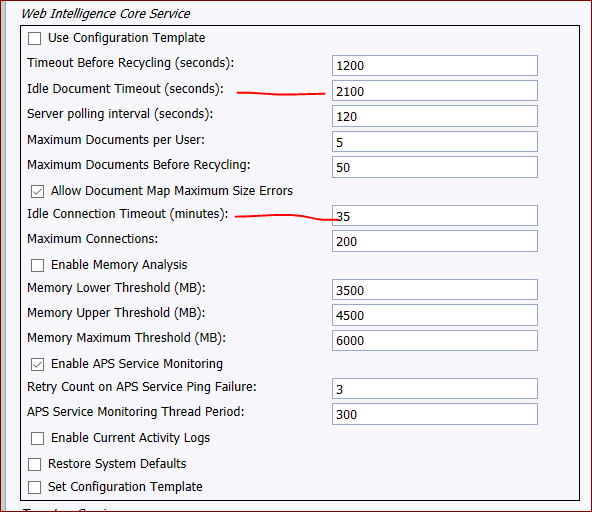
I have an important report recently that required some digging into timeout parameters, and we worked it out, setting the timeouts to 35 minutes, in
Idle Document timeout - 2100 = 35 minutes
Idle Connection Timeout - 35 minutes
Works great and reliable.
Users are asking for 45 or 60 minutes, is there a best practice?
The report runs fine, always under 30 seconds. But it’s used for “board proceedings”, where an Academic council reviews up to 30 students’ records, one by one on the report, clicking through each student. Sometimes the review for a student takes 10 minutes. Sometimes it could generate lots of discussion and go 30-40 minutes. Board members all have the report on their laptop. If they sit idle (listening to the discussion) for 35+ minutes, then when they go to click to the next student, the report has timed out.
If they click here and there during the discussion, that of course resets the timer.
So just looking for a reasonable timeout period whereby an idle report would still be active and usable after XX minutes. We’re currently at 35 minutes which is reliable but the board has asked for 45-60 minutes.
that was my thought! which I posted to the CMC group: “My take is it’s fine to set timeout settings to 60 minutes - what is the harm? (as long as license usage is manageable).”
The Idle Connection Timeout (minutes) setting is the one that affects you most. I have this set to 90 minutes, which matches our Tomcat timeout. Note that this affects only the WebI session and not the BOE Platform session – setting this to a high value should not affect your concurrent session count.
30 seconds seems low! We have it set to match “Idle Connection Timeout” (at 35 minutes), and that configuration (along with Tomcat) seemed to do the trick for 35 minutes. Now we’ll see about bumping it up to 45 or perhaps 60.
 (BOB member since 2015-06-18)
 (BOB member since 2002-08-08)
 (BOB member since 2015-06-18)
 (BOB member since 2015-06-18)