I have a set of two dimensions and one measure. I want to have the line numbers increment by one for each value of the second dimension and restart at 1 when a new a value of the first dimension occurs.
Using BO 6.1b
Here is a sample of my data set and example of the desired output.
name, date, volume
prov1, 1/1/09, 123
prov1, 2/1/09, 456
prov1, 9/1/09, 789
prov2, 2/1/09, 234
prov2, 6/1/09, 345
prov3, 12/1/09, 567
result
name, date, sequence
prov1, 1/1/09, 1
prov1, 2/1/09, 2
prov1, 9/1/09, 3
prov2, 2/1/09, 1
prov2, 6/1/09, 2
prov3, 12/1/09, 1
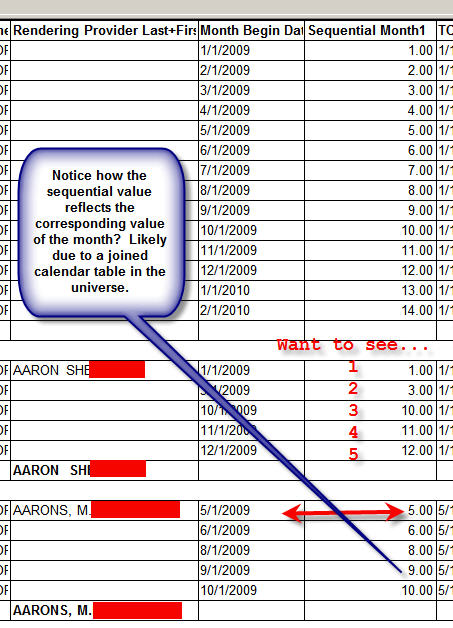
Notice that even if a date/month is skipped, the next data value will receive the next sequential value in the series, like a rank. However, Rank() hasn’t worked because the “measure” is a date value. (I tried converting this to a number by creating a variable that used datediff() of some arbitrary data in the past, but got a computation error.
=RunningCount() ForAll ( ) ALMOST worked, except that the rows were numbered based on the sequence of the month. So Jan. was 1, Mar. is 3, and Dec. 12, regardless if there are any values between in the group. (I think this is due to a universe join in a calendar table that I cannot back out of.)
bmalak_98  (BOB member since 2006-07-06)
 (BOB member since 2006-12-08)
 (BOB member since 2006-07-06)