I already post this question a couple of times but I can’t make it work. I have posted two attachment in this topic.
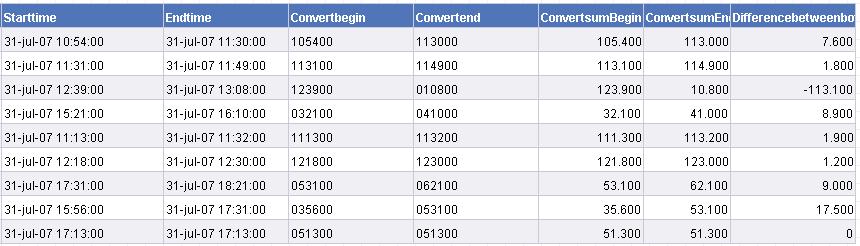
Attachment “Example1” is the webintelligence rapport. I have converted a date/time field to a field so i can make calculation on it but i don’t know ho to convert it to minuts;seconds.
Attachment “Example2” is the thing I want, if i make this calculation in Excel it’s very simple and works perfect. I want this in my Webintelligence report but don’t know which functions/script i need to have.
Moderator note:
Please do not cross-post. It leads to fragmented discussions and is against our forum rules. Please, next time do not open a new thread, continue posting in your original thread instead. I locked all the other threads opened by you :? Thank you.
Hi, I’m using the dutch version of Business Objects, if i translate this to the dutch variables it doesn’t work. I says i’m missing a " or something like that?

 (BOB member since 2005-12-29)
 (BOB member since 2002-06-20)