I have developed a Crystal report (Crystal XI) based on stored procedure. When I run the report, the normal report parameter prompt appears. After supplying the parameters, the report again asks for the database username and password for making database connection.
However, we do not want users to enter this. How can we hard the userid password amd suppress the prompt from appearing?
Please note that the report is has few subreports which are based in Business View, and we the report is published to the BO Enterprise XI R2.
go to CMC then locate your report in the folder menu after that, right click your crystal report and choose DATABASE CONFIGURATION. there you can manually set the username and password for your database connection.
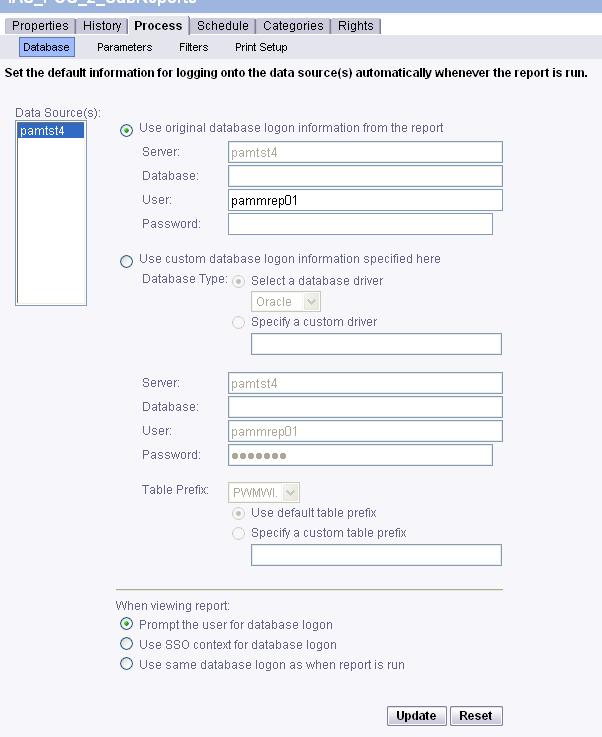
I got the options shown in the attached screen shot. I entered the password here and updated. But it is still prompting. This is because if you see in the bottom of the screen shot, “Prompt user for database logon” is selected in the radio button and it cannot be deselected. I tried selecting the other two options but obviously are not supposed to work.
Can you please tell me if there is some other way to supress the database login prompt.
This is not working because the report login ID and database login ID are different…Each user logins to the BO using their own userID password, but the stored proc should use a different userID and password. That is there is only one userID for database connection and that cannot be shared to the users.
What you need to do, is asked the database administrator to create you a Service Account that will only be used by the CMC. When that is done, you have your account (let say, accountname = “_crystal”), and then you go in the “default settings” of your report and you put the service account username and password into the field in first or second section (it works fine with the first section, but you will have to change it everytime you will “re-import” the report).
Doing like this, the report will always use that username and password to run the report, and users will never see the username and password.
I hope this will help. (I use this concept for all my reports and it’s working fine).

 (BOB member since 2008-10-28)
 (BOB member since 2009-07-08)