How to pass user id and shared secret via query string

Hi ALl,

I want to pass user id and shared secret in URL for BO in 4.1. Can someone please describe step by step how trusted connection works via query sting. In BO 4.1.

We have url in which I am passing user id and shared secret in 3.1 but the same is NOT working in 4,1. Any inputs is appreciated!!

Regards,
hena :crazy_face:


hena (BOB member since 2010-08-17)

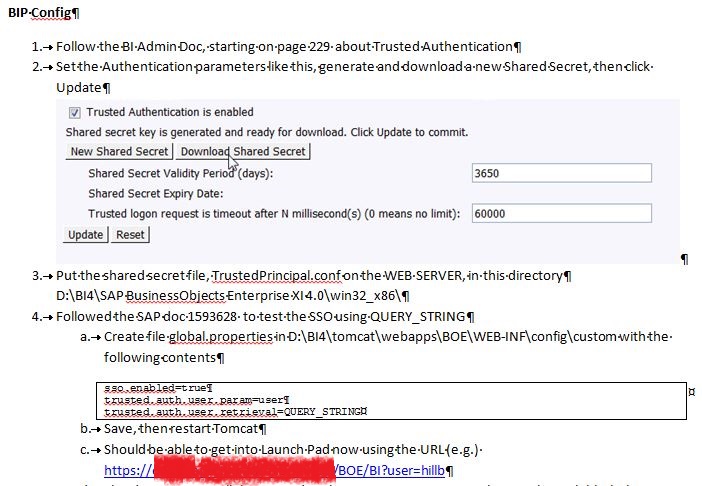
See attached. Replace the user “hillb” with whatever user you want to try.
2015-05-27 12_11_20-Configuring Business Objects 4.1 for SSO Using Shibboleth.docx - Microsoft Word.jpg


thesnow :us: (BOB member since 2011-08-10)

The location of where to place global.properties is for 4.0…Would it also work for 4.1?

Regards,
hena


hena (BOB member since 2010-08-17)

That is where we put it for 4.1 and it worked. We also did not bother with redeploying the war files.


thesnow :us: (BOB member since 2011-08-10)

Thanks. I did exactly what you listed…created trusted authentication using CMC and saved trustedprincipal.conf in the default location.

ALso, made below global.properties changes:

sso.enabled=true
trusted.auth.user.retrieval=QUERY_STRING
trusted.auth.user.param=username
trusted.auth.shared.secret=

But when I click on below link, I am getting the logon page…:

http://ABC2133:9002/BOE/BI/logon.jsp?username=hena

Right now, I am just adding the hard coded username in URL for testing…not getting it from anywhere dynamically.

Please advise.

hena
:hb:


hena (BOB member since 2010-08-17)

Try removing “logon.jsp” from your URL, should just be

http://server:port/BOE/BI?username=hena

I do not have the blank parameter for shared secret in my file, not sure if that impacts anything. SAP note 1593628 has a pretty compact how-to also.


thesnow :us: (BOB member since 2011-08-10)

I tried WITHOUT the logon.jsp but it still does not work.

What do you have instead of blank parameter for sharedsecret? WHat do you put for sharedsecret in global.properties?

ALso, can you share SAP note 1593628 ??

Regards,
hena


hena (BOB member since 2010-08-17)

I just don’t have that line, I only have the other 3. I think there’s a typo in the 4.1 SP2 user guide, where it tells you to set the shared secret parameter to something wrong.

The note appears to be available here: http://solveissue.com/note?id=1593628

Do you get any error message or it just does nothing? What do you have your default authentication set to for Launchpad? You restarted Tomcat after making the file changes?


thesnow :us: (BOB member since 2011-08-10)

I do not get any error - just the logon page.

Where do I check this?

yes it was restarted

I think we have to programmatically pass the user id to the logon page. For this I am planning to create a prelogon page with the following code. But where do I put this prelogon page and does it require accompanied web.xml page??

<%
String user = request.getParameter(“user”);
response.sendRedirect(“/BOE/BI?username=”+user);
%>

Any help is appreciated as always…

:crazy_face:


hena (BOB member since 2010-08-17)

You may need to use that prelogon.jsp for the eventual solution, but if the basic query string method is not working I would expect the other method won’t work either.

It defaults to Enterprise, but you can check your authentication configuration in:

{install dir}\tomcat\webapps\BOE\WEB-INF\config\default\BIlaunchpad.properties

or

{install dir}\tomcat\webapps\BOE\WEB-INF\config\custom\BIlaunchpad.properties

I know it doesn’t help much, but really all I had to do to get the query string piece working was in the SAP note I referenced. If you can provide any screenshots of the Trusted Auth configuration, snippets of your config files where they have been modified, etc. that may help.


thesnow :us: (BOB member since 2011-08-10)

All,

I created a prelogon page to capture the user id in session and pass to the logon page in BO 4.1/ But when I click on the link, it is not working - it is giving missing page error.

Code for prelogon.jsp page:
<%
String user = request.getParameter(“user”);
response.sendRedirect

("/BOE/BI/logon.jsp?username="+user);
%>

URL below gives 404 missing page error:

ttp://abc:9082/BOE/BI/prelogon.jsp?username=hena


hena (BOB member since 2010-08-17)

Where did you put prelogon.jsp?

You can test by putting a copy of your jsp in a location like

D:\BI4\tomcat\work\Catalina\localhost\BOE\eclipse\plugins\webpath.InfoView\web\

and then Reload the BOE path via Tomcat Web Application Manager. Once everything is working fine, put a copy of your custom.jsp in

D:\BI4\tomcat\webapps\BOE\WEB-INF\eclipse\plugins\webpath.InfoView\web\

in case you ever have to redeploy.


thesnow :us: (BOB member since 2011-08-10)