BO XI 3.1 sp2 fp 2.7
Windows Server 2008 x64
Tomcat, standard installation.
I have the default creation/editing tool set to "Advanced (Java 2 required). It prompts the user to download java and the reports (from XI R2) will view and run fine.
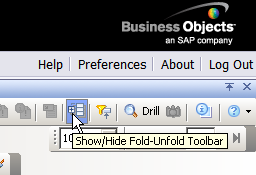
The problem is that there is no button on the right for fold/unfold, like we thought there would be. I have searched high and low in the manual, but I can’t find what we are missing. Can somebody clue me in?
The first time I tried to install SP2 it didn’t work, but it didn’t tell me it didn’t work. I thought I was running the proper service pack but wasn’t. Are you sure the install went completely through?
I’m attaching an image showing where the button is.
Do you have input controls? Query on query? Other items specific to the service pack? If you’re missing all of them, then the SP is not installed. If you have some of them but not all, check for CMC rights and see if there is something that is prohibited. Also try a new very simple document and see if you get the feature. Try logging in as a different user and see what they see.
 (BOB member since 2002-06-06)
 (BOB member since 2002-06-06)
 (BOB member since 2005-10-17)