system
November 10, 2007, 8:24am
1
Hi all group members,
I am working on BOXIR2 SP2
My question is, How to email a report from Inforview on different email address?
In Infoview after selecting a report i clicked on “Send-> To Email” as a result i got an error.
“The destination plugin required for this action is disabled. If you require this functionality, please contact your system administrator.”
Can any member please guide me here, How to send a report as an email from Infoview.
Regards,
izhar (BOB member since 2007-07-11)
Hi,
You must make few setup within your CMC for example destination job server …
Regards
system
November 10, 2007, 6:26pm
3
You have to configure email in the Destination Job Server.
Steve Krandel (BOB member since 2002-06-25)
system
November 12, 2007, 5:08am
4
Thanks,
But i don’t know how to do it.
Can you please tell or reccommand any specific document for it.
Regards
izhar (BOB member since 2007-07-11)
system
November 12, 2007, 5:15am
5
It is not that difficult. If you go into destination job server then the names given there are self explanatory. Check the email server settings and give them there.
bobjkb (BOB member since 2004-03-19)
system
November 12, 2007, 8:16am
6
i have entered following information for "BIserver.destinationjobserver " but even though i am geting same error on Infoview screen
“BIserver” is my system name
Domain Name:
After giving required information i have enabled “EMAIL” option too.
Kindly tell in “Server Name” do i have to enter my system name?
Kindly guide me here.
Regards,
izhar (BOB member since 2007-07-11)
system
November 12, 2007, 9:04am
7
It should be your server name.
bobjkb (BOB member since 2004-03-19)
system
November 12, 2007, 12:01pm
8
Hi, thanks for your cooperation.
For “SMTP User Name and Password” can i enter my email “User ID” and “Password” or there would be any other entry has to be done.
I am also geting JavaScript error too when i try to send report as an email.
You can see the attached gif too.
“http://biserver:8080/businessobjects/enterprise115/desktoplaunch/InfoView/sendto/sendto.do?destination=email&parentId=86979 ”
Kindly guide me here, how to make it successful.
Regards,
izhar (BOB member since 2007-07-11)
system
November 12, 2007, 4:29pm
9
You need to get the IP address of your SMTP server from your mail admin.
You likely don’t need any id/password. If you do, the admin will provide it.
Steve Krandel (BOB member since 2002-06-25)
system
April 1, 2008, 6:16am
10
After you config SMTP in your Destination Job Server, you need restart it.
Jcat (BOB member since 2007-06-09)
system
July 18, 2011, 8:24pm
11
Hello Experts,
I have a quick question. We have already configured SMTP on our BOXI3.1 jobserver. But What I need to know is if we have an option to restrict the users e-mail to their official e-mail addresses meaning users can only send e-mails to their official E-mail IDs. Appreciate your quick help.
its_vicky07 (BOB member since 2007-09-02)
 (BOB member since 2007-07-11)
 (BOB member since 2002-06-25)
 (BOB member since 2004-03-19)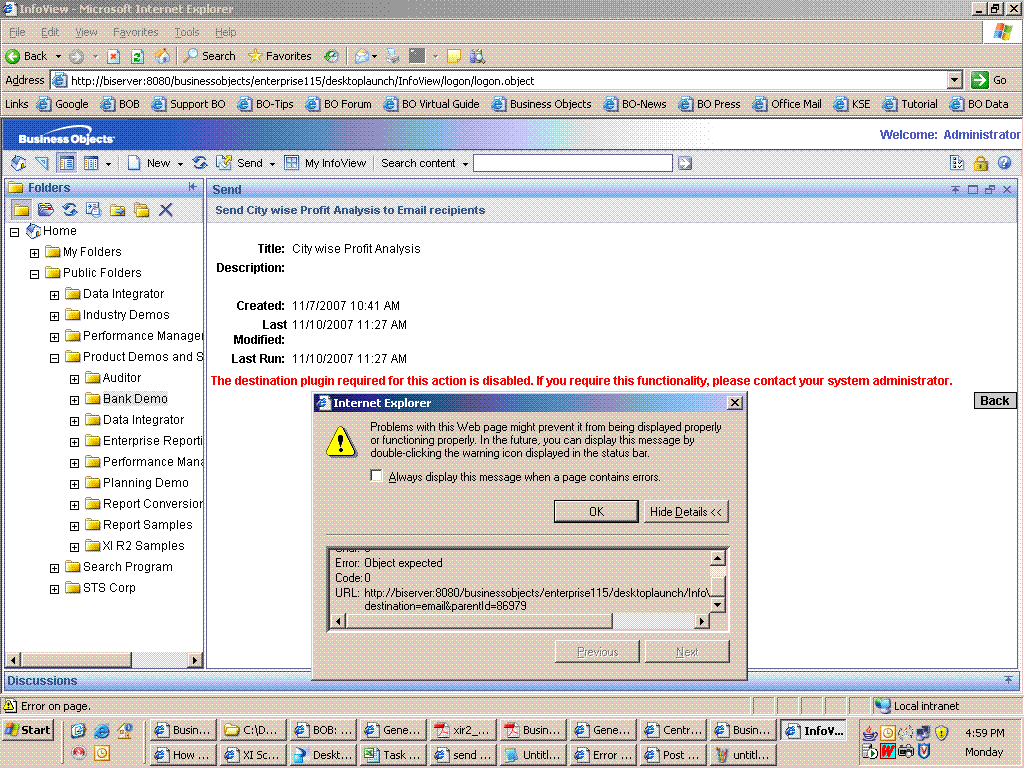
 (BOB member since 2007-07-11)
 (BOB member since 2007-06-09)