Hi guys,
We migrated the Database server (including the BO internal databases) to another server. Anyone please can tell me where in do I need to change in order for BO to point to the new server ?
Thanks !
jonimatix  (BOB member since 2007-12-03)
Hi guys,
We migrated the Database server (including the BO internal databases) to another server. Anyone please can tell me where in do I need to change in order for BO to point to the new server ?
Thanks !
jonimatix (BOB member since 2007-12-03)
If you are talking about the report datasources then open Designer and modify the connections where the new database has to point to
.
haider  (BOB member since 2005-07-18)
Ok so I only need to change the connection from the Designer to point to the new server and that should do it?
Thanks
jonimatix (BOB member since 2007-12-03)
Yes, but you did not tell the database.
If its Oracle then the service name(TNSNMAES.ora) will do.
In case of SQL server, if its using ODBC DSN then the same need to be created first from control panel and point universe connections to it. While an OLEDB network layer will only need the database and server name.
.
haider (BOB member since 2005-07-18)
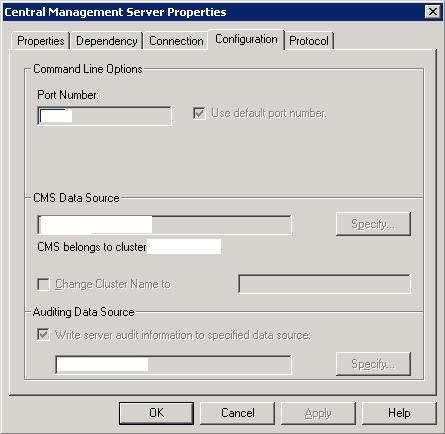
If you have moved the CMS database, then you will need to change the connection information in the CMS service.
You can do this in the configuration area of the Central Configuration Manager, for the Central Management Server.
cashworth (BOB member since 2005-02-09)
Haider,
I am using SQL Server 2005 and with connection to BO using OLEDB… I thought that I needed to change some settings within the CMC but apparently it is simpler than I thought.
jonimatix (BOB member since 2007-12-03)
cashworth,
Yes i also moved the BO internal databases. I shall also change the connection properties within the Central Configuration Manager.
However I found no indication to the database server in the Propreties of Central Management Server. I would be glad if you help me in this more specifically.
jonimatix (BOB member since 2007-12-03)
In CCM, stop the CMS and then look for “Configuration” tab and then select for the new database connection as can be seen in the image here
bambazooka  (BOB member since 2007-01-26)