system
November 16, 2011, 11:34am
1
Hi all
I’m now to this forum, so sorry if this is the wrong thread where I’m posting.
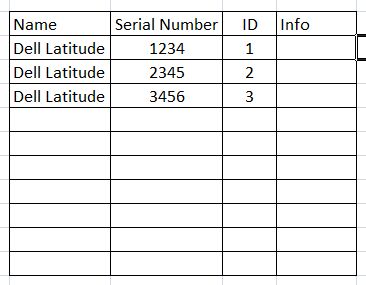
I need to create a report which has some empty rows at the end. I have attached a screen shot which shows what I exactly mean.
So there is a title bar, some results and then there should be e.g. 10 empty rows.
Is this possible? If yes, how can this be achieved?
Many thanks in advance!
Helmut
Helmut (BOB member since 2011-11-16)
system
November 16, 2011, 11:45am
2
Insert a footer row - either a total or a count. Doesn’t really matter what as you can delete the formula later. Now highlight this row, right click and insert as many extra rows as you like.
debbie
Debbie (BOB member since 2005-03-01)
system
November 16, 2011, 12:40pm
3
Hi
Tricky one is select any column and in the top click on the sum wch is beside apply/remove sort
then u will see a new row will be created , and then click on new row right click and insert as much u want .
Hope this helps u
sunil kumar (BOB member since 2011-10-03)
system
November 16, 2011, 1:01pm
4
Many thanks to both of you - this was a really fast answer!
Thanks
Helmut (BOB member since 2011-11-16)
 (BOB member since 2005-03-01)
 (BOB member since 2011-10-03)