I want to add a Excel document as new dataprovider in
Web intelligenceXI R2.
How can i do that.Please specify steps also…
DoSTh  (BOB member since 2007-05-31)
I want to add a Excel document as new dataprovider in
Web intelligenceXI R2.
How can i do that.Please specify steps also…
DoSTh (BOB member since 2007-05-31)
Personal data providers are not possible with WebIntelligence XI R2 
Andreas  (BOB member since 2002-06-20)
They are not supported as mentioned by Andreas.
If you still need to solve the issue here is the recommendation form BO:
Build a universe against your XLS file and upload the universe into the CMC.
This means that you also need to define the ODBC source on the webi server for your excel spreadsheet. This could be an issue if the data is somewhat confidential.
Eventually you will end up with a big mess in your CMC. So yes it can be used just make sure you don’t over use or abuse this possibility.
Alternative wait for the end of the year the next release of webi (the one with the local webi client for improved performance, …) This release should have personal data-providers.
From what I have seen and heard it is not yet clear to me if this will work from infoview as well.
ClaireB  (BOB member since 2002-08-09)
Can we use excel as data provider in desktop intelligence?
Satyaa (BOB member since 2008-04-02)
Yes… We can choose Excel as our personal data provider in Desktop Intelligence.
Jansi (BOB member since 2008-05-12)
Thanks Jansi.
Could you please with below query as well?
I have a requirement where I need to link spreadsheet with universe.
ex: I need to create a report where input parameter value is coming from spreadsheet and rest of report is based on universe.
My question is how to link spreasheet with universe?
I hope it is clear.
Please Help.
Satya.
Satyaa (BOB member since 2008-04-02)
Hope you have a(many) data provider(s) depending on your requirement. Now create another data provider (by selecting personal data provider and by selecting the spread sheet you want to be used by checking ‘First row contains column names’) and then have in the link the common dimensions from the View data -> Dimension 1 from DP1 and then link to -> Dimension2 from the Excel DP (Just as same as linking two data providers)
Jansi (BOB member since 2008-05-12)
If you want to create a prompt using Excel spreadsheet then build a universe based on the Excel file
.
haider  (BOB member since 2005-07-18)
Thanks Jansi and Haider,
I will think on both the solutions and I will use appropriate one.
Satya
Satyaa (BOB member since 2008-04-02)
HI Jansi/ Haider,
I have created new DP with excel and linked on common dimension. Now I want to create prompt in a prompt in a report.
I will not be using field from excel in a report. that will be only in a prompt. How to go about creating a prompt in a report based on excelsheet.
Please suggest.
Satyaa (BOB member since 2008-04-02)
Jansi  (BOB member since 2008-05-12)
How is this possible?
vinod_menon (BOB member since 2007-04-09)
I didn’t try this before…
But I think it can be done by creating a new connection through which we can have our excel as our data source for the universe.
Jansi (BOB member since 2008-05-12)
I don’t think you can define a universe connection with excel as data source. There is no such option in the Connection Wizard in Designer.
One option is dumping excel data to an access file and connecting to the access file. But updating data from excel is going to be cumbersome.
Please post if there’s an alternative.
vinod_menon (BOB member since 2007-04-09)
If your requirement is simply to use your personal data provider (Excel spreadsheet in this case) to generate values for an LOV, we have this capability in Designer.
Go to Tools > List of Values > Edit a List of Values… choose personal data provider.
Look into this. See screen shot.
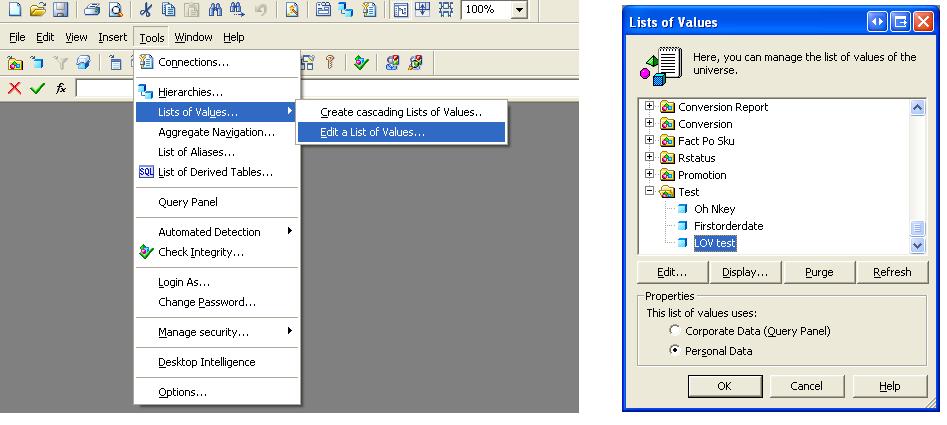
twenty5 (BOB member since 2008-01-22)
does anybody tried using excel as source for universe?
is it possible?
Satya.
Satyaa (BOB member since 2008-04-02)
Can we create derived table in a existing universe with excel as datasource.
Please let me know.
Satya
Satyaa (BOB member since 2008-04-02)
You can’t drop an Excel source into an existing universe if it uses a database connection, what are you trying to do, exactly?
Mak 1  (BOB member since 2005-01-06)
Hi Mak1,
I have a report which is based on universe and need to create a parameter in report which will be based on excel sheet.
What would be best approach other than copying the data from excel to DB.
Please suggest.
Satyaa (BOB member since 2008-04-02)
 (BOB member since 2005-07-18)