Yes, you need an axis value. In your case there is no column specifying the column it should go to - why is value_2 = 0.8 and not value_1? Because of its position. Hence the axis value will be a counter per group, first row has axis_value=1, second axis_value=2, third - it’s another group - axis value 1,…
I’m also needing some help. What if the number of rows per group varies, not fixed. In the example given, it is fixed to 2 rows per group, what if group 1 has 3 rows and group 2 has 4 rows etc.
In fact what I need is say we are dealing with some groups running into 100 rows per group and want to output 1 row only with the non pivot columns and then either 1 column with all the row values for that column concatenated together or stored in separate columns.
Any ideas?
gchanteu, can you elobrate what you mean by " will use 2 query to get my value separatly and than a self join" and can it work with my scenario above where the number of rows per group varies?
I’m also needing some help. What if the number of rows per group varies, not fixed. In the example given, it is fixed to 2 rows per group, what if group 1 has 3 rows and group 2 has 4 rows etc.
In fact what I need is say we are dealing with some groups running into 100 rows per group and want to output 1 row only with the non pivot columns and then either 1 column with all the row values for that column concatenated together or stored in separate columns.
Any ideas?
gchanteu, can you elobrate what you mean by " will use 2 query to get my value separatly and than a self join" and can it work with my scenario above where the number of rows per group varies?
A table can have as many rows as you want, but the number of columns is fixed. So when you use a reverse pivot, you need to specify the upper limit of columns. Just imagine your target table has 100columns and suddenly your source has 200 (different) rows for a pivot set. What should happen then?
I know what you mean but actually … and I’m sure others also have had this need; I want to collapse the rows and transform specific input column(s) of the N rows into a concatenated string (in new output column(s)) identified by the non-pivot columns.
So the reverse pivot first comes into mind as a halfway technique to getting there … but is it?
From:
1  AAA  XXX
1  BC    MM
1  QW   KKKK
2  GG   HHHH
2  NNN  SS
9  Z     BVBV
9  A     NBNBN
9  QQ   UPUP
9  IIII FGGFGFF
Producing a concise output per common id, yknow the usual applications are in like multiple address lines into 1 line, multiple surname, firstname entries into list of names, multiple city entries into list of cities etc. The key in these types of data structures is there is no pre-known finite list of axis column values - hence N rows, could be 1 could be 200 rows. How do we do this in DI the tool of choice?
This is what i have done to transforme the data below :
ID  CODE     VALUE                  ID   VALUE_1   VALUE_2   VALUE_3
1     V        1                     1      1         2          2
1     J        2         ------>
1     R        2
With 3 query i get the 3 rows (with the CODE in the where clause) and than in another query i join the 3 query by the ID.
With this solution i don’t need to know the value (axis value)
Ya I wish it were that simple honestly, as wdaehn said, in your case you KNOW the values upfront hence they are your axis values. If you had used the Reverse_Pivot transform and set CODE to be the Axis column and added 3 Axis value rows (1xV, 1xJ, 1xR) with same prefix value, I believe your output would in fact be labelled automatically by DI as V_VALUE, J_VALUE, R_VALUE.
In my case I’m asking for ability for when we can’t possible supply all the axis values into the transform. And there are so many reasons for it being so - for one eg because there are too many (try typing up 200 values), because they aren’t necessarily unique, because they could be any varchar. :?
You’re welcome I thought you’d be a happy camper followin my post. Lucky you but also its always great when someone has their prob solved. So never a pointless question
 (BOB member since 2007-06-29)
 (BOB member since 2004-12-17)
 (BOB member since 2004-12-17)
 (BOB member since 2005-07-27)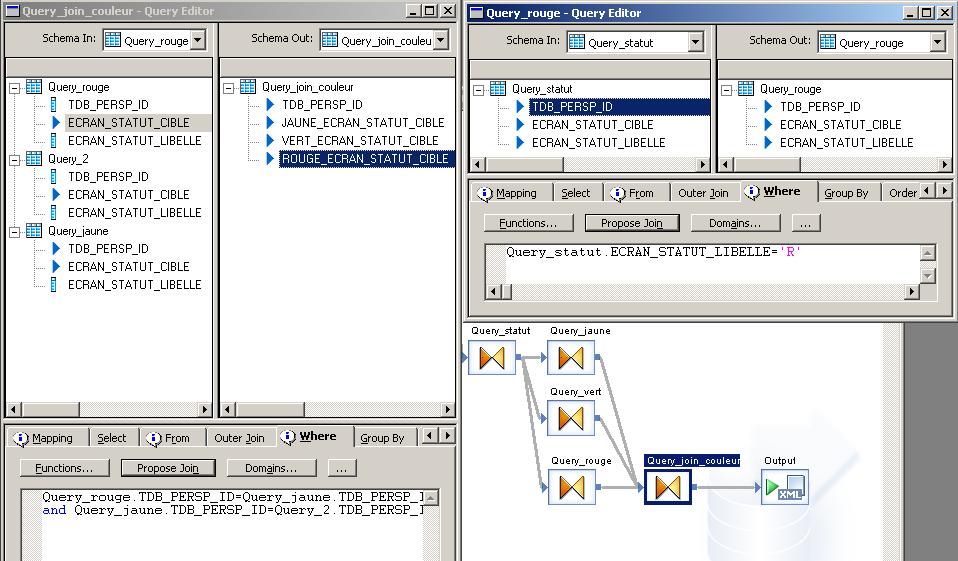
 (BOB member since 2007-06-29)