I have two universes. There is a date object in each one. It parses fine.
When I create a WID with one and put that date object in the query filter, and do something like greater than or equal to, the SQL generated by this data provider gives me the date in this format:
WHERE RECORD_DATE > '2003-01-01 00:00:00'
However, when creating a WID and query filter with the date object in the other universe, I get this format:
WHERE RECORD_DATE > '01-01-2016 00:00:00'
I haven’t been able to figure out where this is controlled. I want the format shown up top, i.e. yyyy-mm-dd. I’ve checked both objects. I’m trying to figure out whether this is controlled in the universe, WID, data provider, prompt, etc. but I’m a loss.
This is the SELECT from the date object that I’m happy with.
CWA_ETL_RUN.DATA_DATESTAMP
This is from the other one.
FM2_CENCMB_002.REVISED_END_DATE
I’ve attached the error message that I am getting when using the second one in a query filter via a prompt. It reads, “The string representation of a datetime value is out of range.” Ref. Figure 1 in the picture.
Interestingly, when I use a constant in the query filter instead of a prompt and then click on the View Script icon up top while still within the data provider / query panel, it shows me the format that I do want. Ref. Figure 2 in the picture.
There is one other thing. The top one (CWA_ETL_RUN.DATA_DATESTAMP) is from a universe connecting to an Oracle database while the lower one (not giving me the date format that I want when using it in a prompt) is from a universe connecting to an IBM DB2 database. Could that be a factor?
Try looking at how they are defined in the database with a tool like Toad. For example, I have a date column in a SQL Server table that’s defined as datetime, another as smalldatetime and another as date; the formats are different.
i am curious where did u use the sql .
normally , the sql only works fine in bo system.
the system will transform the string into date according to the configuration.
witch makes the sql will raise a error when it is runned in db directly
I’ve attached a picture which will help explain my problem a little better. Yes, I’m looking at the SQLs generated by the data providers. Figure 5 is the happy one, the one running without an error.
The problematic universe is connecting to an IBM DB2 table and the one that works fine is connecting to an Oracle table so maybe that is where I need to focus more, as suggested by Chaz. I haven’t gotten to that yet.
Yes, there must be some configuration or definition difference somewhere, but I haven’t been able to find it yet. And I also need to look at workarounds, e.g. the one suggested by yogamalaka.
 (BOB member since 2011-01-19)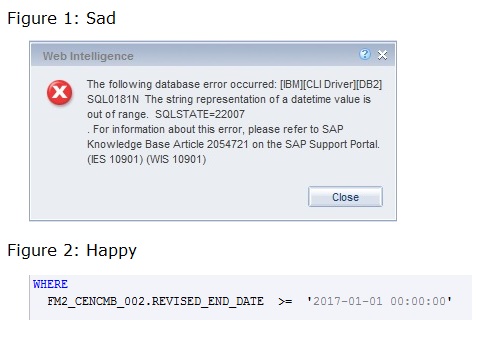
 (BOB member since 2011-01-19)
 (BOB member since 2009-11-10)