Hi,
I have a WebI 4.0 payroll report that is written directly on the BEx Query (no universe). One of the report prompts is for a required pay period end date.
Initially when I started designing this report, the date prompt displayed a calendar control rather than a LOV. In researching that issue I learned that I needed a character field, rather than a date field. So I created a second pay period end date that is stored as a character string rather than a date.
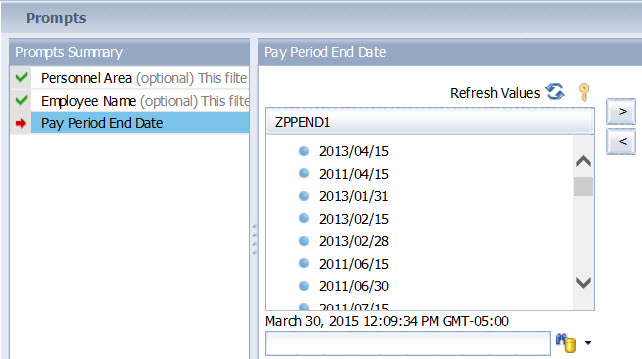
Using this field for my prompt does create a LOV, but the dates appear to be in a purely random order (see attached screen shot). I tried using the BEx Query sort option, but I’ve been informed that does not work in WebI.
I’d really like dates in the LOV displayed in descending order, but ascending would be acceptable as well. I know I can click on the heading in the LOV to resort the list, but most of my users won’t know that. I could try to educate them on how to resort the list, but past experience tells me I’ll still get a lot of complaints. This report goes out to over 100 users in our company.
Is there any way, short of adding a universe layer, to get these dates sorted on the initial LOV display?
Thanks for your help!
[/img]
JSW (BOB member since 2013-01-15)