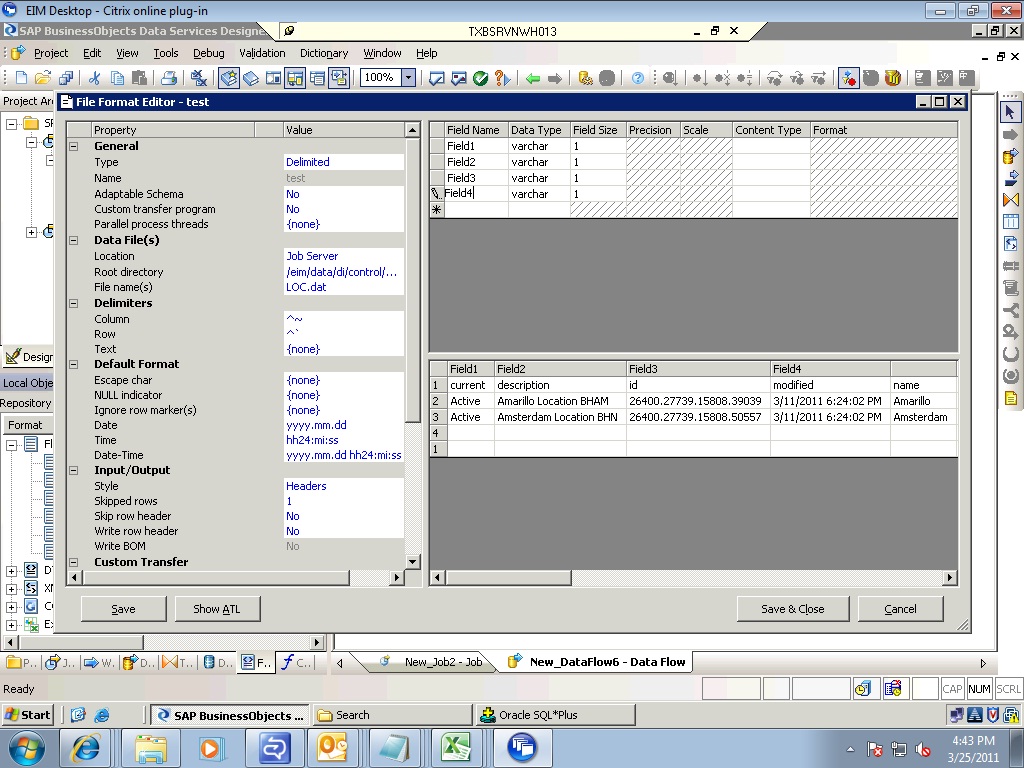
I have to load a flat file source to target table. For this I have created a file format, set the options in that and able to view the data from the file in the file format with the first row as headers.
I need these header columns in the right side above portion of the flat file editor where field1, field2, field3…with datatypes and size are there.
PFA screen shot.
I dont find any option to get the header names automatically into the upper portion of the displayed data in the flat file editor. I am giving these header names, datatype and size manually in that space to map these header columns to the target table columns in the query transform.
Open a new File Format Editor and follow the steps
→ Before keying in anything, goto option “Skip Row Header” and make it to ‘Yes’
→ Provide the Root Directory
→ Provide the File name. As soon as you enter this and tab out, the editor will throw a message like “Overwrite the current schema with the schema from the file you selected?”
→ Click ‘OK’ and you will get the Header names in the Field Names list and the Datatype on the Top
you can create your file format outside of DS and import it much easier.
save it as a .fmt (or .dmt for delimited) and you import it just like any other .atl file.
and we use FirstLogics FirstPrep to build these. (this comes with DQ 11.7)
I like to point this out… because we spent many months building them the hard way, then one day noticed the drop down in the import box that included the .fmt/.dmt extension. It would have been fabulous if any of the consultants or trainers we had could have told us this.
Very interesting. The import creates a Flat Files Format object? Could you post what the source in the .DMT file looks like? (or even a portion of it)
Nevermind, I looked at your post above and the contents of the .dmt file look pretty simple.
Interesting. I would not have suspected that as flat files are not specific to a DQ license.
one thing to note would be that for fixed files, most of our formats include an EOR. So when we import it, we have to remove it or it will create duplicate carriage returns on output. It converts the binary eor to a blob. Then you have to remove the linefeed setting, and add it back in.
The .dmt delimited formats can optionally include the maximum field length, if you dont want to import every column as varchar(255).
I have also written a script that will convert a flat format file export to a .fmt file. This is a pretty simple script, but it saves a lot of mapping time.
I guess I needed to clarify that this is a python script.
you create a folder and it sweeps and converts each export. exports should probably be for one format at a time… and I dont believe it yet does delimited files.
I really dont use it very often, but if its a big layout it comes in handy. genFmtFromAtl.zip (0.0 KB)


 (BOB member since 2008-07-17)
 (BOB member since 2009-10-27)


