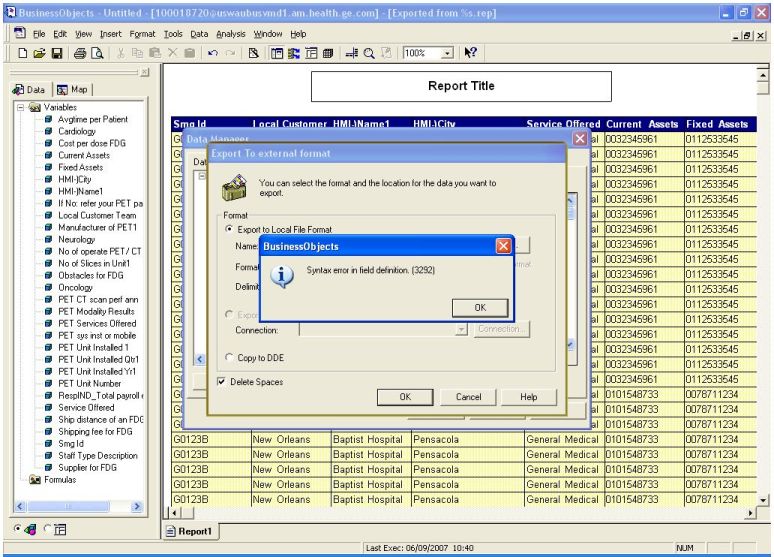
Am facing a very weird problem while doing an export to excel. I get an error which says " Syntax error in Field Definition (3292)" -“Export failed (DMA0005)”
Am using Business Objects version 5.1.9. It is really strange since the data can be exported to .txt format but throws an error when exporting to excel
Has anyone faced a problem like this before? By the way, my objects do not have special characters in particular just a colon : …can anyone help me out with this?
The topic is ancient true…went through all the links there but find nothing that fixes my problem. Point is…the object throwing the error has no : in it…Name change did not work either…the only reason I can think of is that some values come up as #EMPTY in the data manager…
The reports based on this universe would be totally ad-hoc and my clients want to just pull the data into excel…
They would want to know why BO is not able to do something that it is supposed to and I have no answer to that…
I can ask them to use the copyall function and do a paste but that would be as a last option…
Version is BO 5.1.9 so basically this should have been fixed way back…
The Copy and Paste Function works perfectly fine. I would have assumed that it was an excel problem, but it happens with everyone for the same query, the same objects in particular.
And the objects do not have any special characters in their query at all. Again #EMPTY seems to be the only reason, but what I do not understand is there are other objects which don’t have any data too and they do not give any problem
I have given the Copy Paste option as a workaround, but my clients do not seem happy about an extra step as they call it. Any more clues for me??
Ok… are the “Blank” values at the beginning of your result set? With that assumption in mind, I’m thinking that the “Export” is attempting to “define” the exported data type by the contents of each column. If the first dozen or so rows are blank, it doesn’t have any value to make that determination and is failing.
Try changing the sort on your incoming data to make sure at least the first row has data returned for every column.
Sort your data so that you have values for every column for the first row in your result set. Then try to export and see if that resolves the issue. If it does not, then try again without your two undefined or empty columns.
In your screenshot I see that the option ‘Delete Spaces’ is selected.
What happens if you de-select it.
I can imagine that deleting spaces from a null-value returns an error.
OK, if this is true, it’s a bug
If you don’t want spaces in your XLS-file you can set the option ‘Remove trailing spaces’ in the query-panel.
 (BOB member since 2002-06-17)

 (BOB member since 2006-02-06)