Dear all,
Environment: BI4.2 SP6
while I am connecting ORACLE DB I am getting this below error message.
I have Installed both 64/32 Oracle Client setup in Server.
Initially it was working fine. After reboot the server facing the issue.
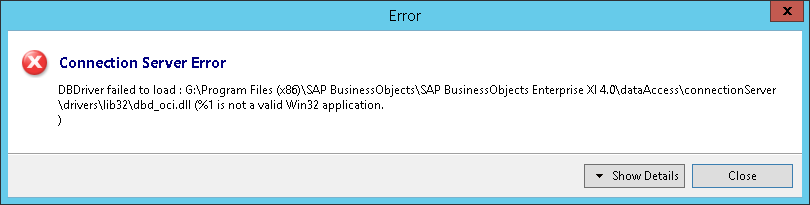
I am getting below error.
DBDriver failed to load : G:\Program Files (x86)\SAP BusinessObjects\SAP BusinessObjects Enterprise XI 4.0\dataAccess\connectionServer\drivers\lib32\dbd_oci.dll (%1 is not a valid Win32 application.
)
Did you install the 32-bit driver before the 64-bit driver? If not, then that is likely your problem.
Also, check the security permissions on the Oracle installation folder. Make sure your user ID has permission to access the entire directory.
You said you installed on the server but your screenshot looks like IDT. IDT can be set to use either local middleware or server middleware; if your using local (or if you’re using local connections), then you’ll need the 32-bit Oracle client software on your computer.
Hi,
I am checking at server it self only.i am bale to do TNSPING also for Database.
I have installed with administrator rights only.
how can we check whether oracle rights is having or not.?
Hi,
How to check the permission of the folder from root folder from D:app\ which access should be there for both write & read access for folder.
thanks
ravi
 (BOB member since 2002-08-29)
 (BOB member since 2003-11-27)