Good day,
I have a CR 2011 report that worked fine in SAP Business One 8.82 but when migrating it to SAP Business One 9.2 PL05 with CR 2013 in the serever, the report stoped working as usual.
The report uses both the SAP database and an Excel file & asks for a parameter. The error message that SAP B1 showed when running the CR was that the CR 2011 could’t be oppened, after a lot of reading and thinkering we pinpoint the error to the Excel file.
The report works fine in the CR Designer
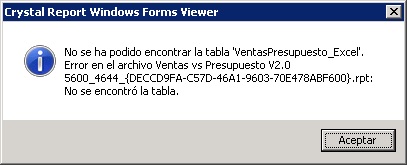
I changed the connection of the CR so that the excel file would be a OBDC conection instead of the original Excel/DAO connection and that alone let us run the report in SAP B1 Client and asks for the parameter, however it stops runing in the client and shows a “Crystarl Report Windows Forms Viewer” dialog showing:
“Could not find table ‘TableName’. Error on file Filename 5600_4644_{DECCD9FA-C57D-46A1-9603-70E478ABF600}.rpt: Table not found”
I attached a image of the error, it’s in spanish but I hope someone can releate and maybe solved this issue in the past.
franciscomecen (BOB member since 2017-03-13)