Cartesian join?

Using DI 11.5

We use a Case transform to delineate new rows from all rows, pass the new rows into the Key Generation transform, and then rejoin the new and all rows in a third transform, using the keys from the Key Generation transform with the remainder of the data from the all rows branch of the Case.

The problem I’m running into is that, in one job in particular, DI is doing a Cartesian join as soon as it exits the Case statement, attempting to send 118500 squared records into the Key Generation, which overloads it, causing errors. I’ve tried replacing the Case transform with a Query transform, parsing out only the new records, and sending that along to the Key Generation transform, but it’s still having issues.

All of the rows are new, as this is a new job, and it’s going to populate right around 118500 rows. Is there some way to tell DI not to attempt any joins until the Transform where the new_rows branch is joined to the all_rows branch, and not immediately out of the Case Transform?

BTW, I stumped our resident DI answerman with this one, as he has no clue why it’s doing what it is doing…


jamonwagner :us: (BOB member since 2007-03-14)

Can you please post a screenshot of the DF? Just to get an idea about where the cartesian join does happen…


Werner Daehn :de: (BOB member since 2004-12-17)

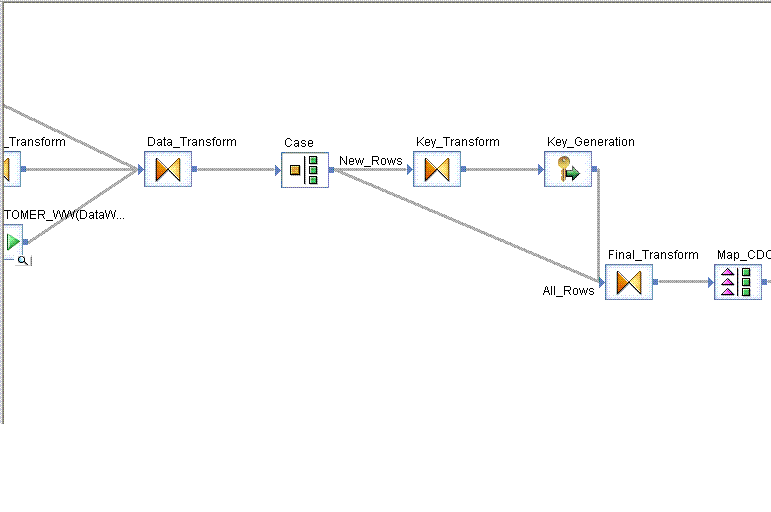
Sure. Should have thought of that sooner. Please see the attachment. The Cartesian join of All_Rows and New_Rows happens between the Case and the Key Transform.

The Case Transform has 118500 rows going into it. All_Rows is defined as all rows that match the criteria 1=1. New_Rows is defined as rows that match the criteria: Data_Transform.ORD_CUSTOMER_SEQ_NBR = 34031. All rows are currently new rows. Key Transform has 118500 squared rows going into it, instead of the 118500 rows I’m expecting.
Cartesian_Screen_Shot.GIF


jamonwagner :us: (BOB member since 2007-03-14)

Well, the key_gen definitely should not be part of any cartesian product. I assume you are certain you have lots of keys and not just a thread of that name with high row counts?

Either way, I’d like to look at this from an higher ground. With the little information I have I would guess you are implementing a Table Comparison transform manually. What’s the reason?

Maybe we can get around that and make the entire dataflow more streamlined at the same time.


Werner Daehn :de: (BOB member since 2004-12-17)

The process fails in Key_Generation because the database field which is used to generate the key overflows. It’s defined as NUMBER(8).

Process:
Read from disparate tables in two different databases, creating two recordsets with the same fields. Merge them using the Merge Utility. Data formatting is then done to ensure that the datasets have the same format (initial caps on name and address fields, a couple description lookups based upon codes coming from each dataset, etc.) in the Transform that is just off the left of the screen shot. The Data Transform brings in common data from two more feeder tables to populate the few remaining fields which are empty to this point. The Case, I’ve already spoken about. The Key_Transform’s only purpose is to skinny down the number of fields, sending only the production key (however many fields are necessary for a unique key) and the datawarehouse surrogate key field to the key generator. The datawarehouse key is then populated in the key generator. The Final_Transform does an outer join (with All_Rows being the outer, Key_Generation being the inner), using the production key as the join criteria in the where clause. Row are then fed into the CDC Mapping Transform, and then down to the table.


jamonwagner :us: (BOB member since 2007-03-14)

Still not getting a grasp on it.

Can you describe a simplified version with sample data?

e.g. Data_Transform outputs the row: 1,Werner and this should become

1, Werner, Werner of type Insert after the Map_CDC.

Something like that…


Werner Daehn :de: (BOB member since 2004-12-17)

OK. Here goes.

Pulling data from the SITE table in one database (with SITETYPE = ‘Customer’) and from a customer table on another database. In both instances, I’m doing lookups to populate fields that don’t exist on the base tables. So, I end up with two datasets of customer information, each with 45 fields, which are then merged. One of the lookups done is using the composite key to look at the datawarehouse table to see if that key already exists on the table. If not, the default key for this table is 34031.

For simplicity’s sake, I’m not going to list all 45 fields, or real data.

So, following the merge, we have:
34031,Microsponge,5 Technology Drive Suite 200,Redmond,WA
222222,HAL,2001 Dave Dr, Jupiter, PA

It then gets fed into two more transforms; the first makes sure that all data is formatted the same, the second adds about 90 fields’ worth of common data (almost all of it is information about the employees here in charge of the different aspects of the account).

So, after the Data_Transform, we’re looking at:
34031,Microsponge,5 Technology Drive Suite 200,Redmond,WA,Joe Blow,jblow@joeschmoe.com,(999)555-1212
222222,HAL,2001 Dave Dr,Jupiter,PA,Mike Rowfone,mrowfone@canyouhearmenow.com,(999)555-2121

Now, it goes into the Case statement. We know that any record with 34031 in the key is a new record, and needs to have a key assigned to it. So, those go merrily on their way down the New_Rows path, and also go down the All_Rows path. Any record without 34031 as the key just goes down the All_Rows path.

It just so happens that, because this is a new job, all of the rows currently have 34031 when they hit this point in time, so all go down both paths.

Then, in the Final_Transform, I have the full recordset from the All_Rows path, and only the production key and the surrogate key from the New_Rows path. In the Final_Transform, I match up the production keys of the New_Rows and All_Rows, and use the appropriate surrogate key.


jamonwagner :us: (BOB member since 2007-03-14)

With Table Comparison you can lookup the row with key=34031 and will get all column values like the surrogate key. You got that point, did you?


Werner Daehn :de: (BOB member since 2004-12-17)

I’ve never used Table_Comparison before. Looking into it now.

OK, so, how does one use it? I have my surrogate primary key, which is currently set to a default value based upon a pre-determined “unknown” record in the table. We generate a key based upon that table, then use the CDC structure to insert or update records as needed. (Several of our data load jobs use CDC, but this one can’t; we “fake out” CDC information in these scenarios to do the table updates)

We’re all pretty new to BODI; I’ve only been working with it for a month and a half, and the resident “expert” has been working with it for less than a year, so some things which might be self-evident to others is beyond us…


jamonwagner :us: (BOB member since 2007-03-14)

Sorry; just had a “Duh!” moment. Converted the Case to do Insert_Rows and Update_Rows, send them off to do the different processing (generating keys, setting CDC), then merging them, rather than doing a key lookup. Much, much quicker, and getting the proper number of rows.

Still not sure on the Table_Comparison; how do keys get generated there? Do they have to be generated beforehand?


jamonwagner :us: (BOB member since 2007-03-14)

This will help you a lot: http://www.consulting-accounting.com/time/servlet/ShowPage?COMPANYID=43&ELEMENTID=1221


Werner Daehn :de: (BOB member since 2004-12-17)