Hy to everybody.
I use this query to select all the webi reports of an universe
SELECT TOP 10000 si_id, si_name,SI_AUTHOR,SI_LAST_RUN_TIME,SI_PARENTID, SI_ISTANCE from ci_appobjects, ci_infoobjects where PARENTS("SI_NAME='Webi-Universe'", "SI_NAME='NAME_OF_THE_UNIVERSE'")
it works perfectly, but it select all the report, also the istances. I would like to take only the main reports…how i can edit this query to find it?
Thanks in advance
Almost exactly what the sort of thing i was looking for. This works great, with the suggestions, for one universe at a time but does anyone have any idea if this can be changed to just give a count of reports against all the universes i have? I’ve got quite a few
Thanks for that, the first one did seem to work, but i think my original post wasn’t very well written sorry. What i was after is a list of universes with a count of reports against each one. So i can get rid of universes not being used.
Sort of like this thing (but this doesnt work ):
SELECT count(si_id), si_name from ci_appobjects, ci_infoobjects where PARENTS("SI_NAME='Webi-Universe'", "SI_NAME is not null") group by si_name
also what does the PARENTS function do in the code i dont understand that bit?
In that case, Query Builder will be of no use to you. “Group by” is not supported and you would need to group by the universe name or id to get a count by universe. The SDK is what you need to essentially implement your own group by. There may be a utility available in the downloads section that performs this functionality.
Edit: See this blog for information about relationship queries.
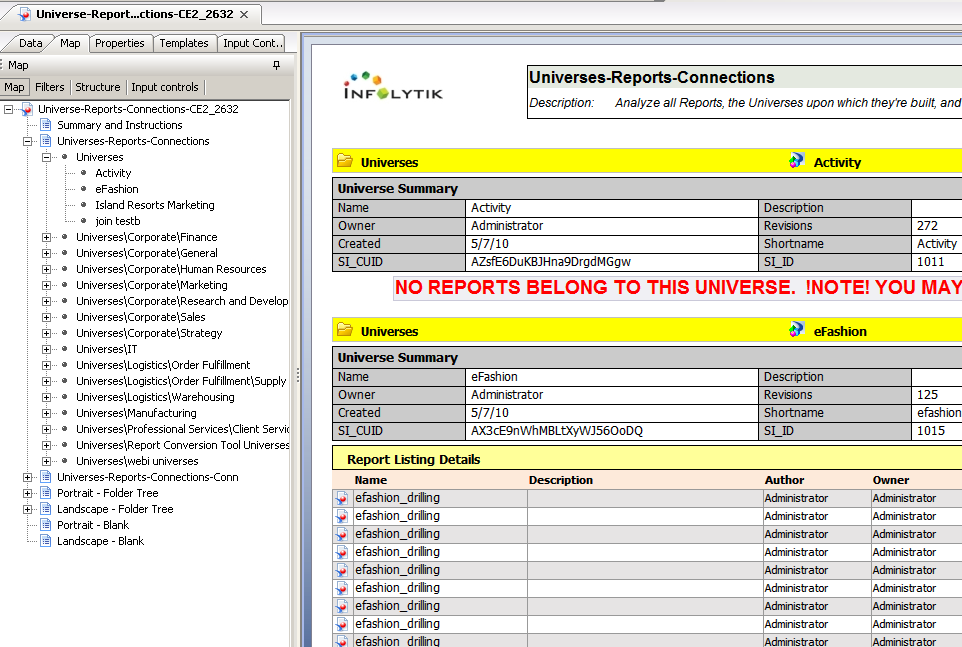
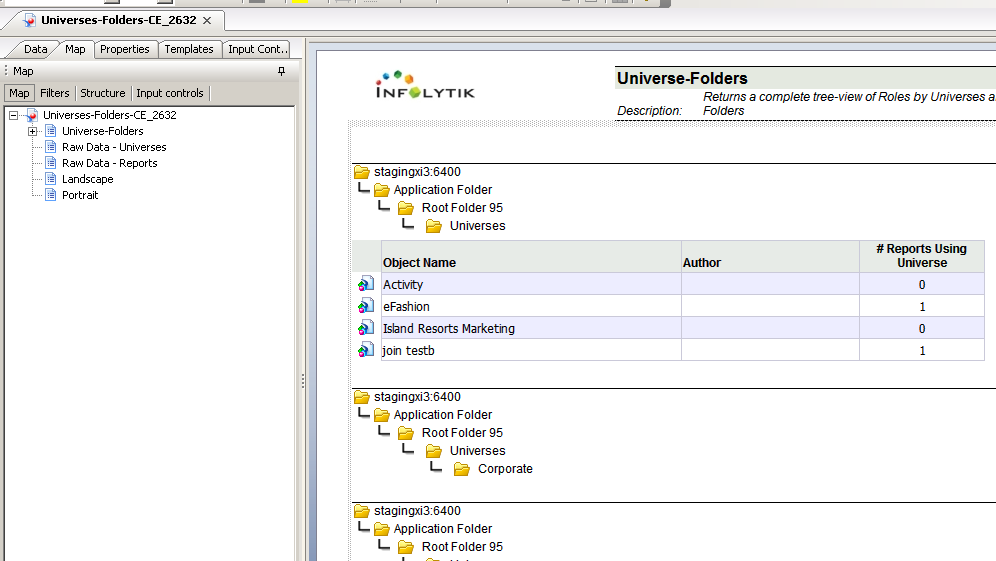
The most painless way to achieve what you’re after would be to use CMS/Connect Community Edition. It’s - simply put - a data driver to your CMS / enterprise metastore that allows you to report against its contents from within Web Intelligence.
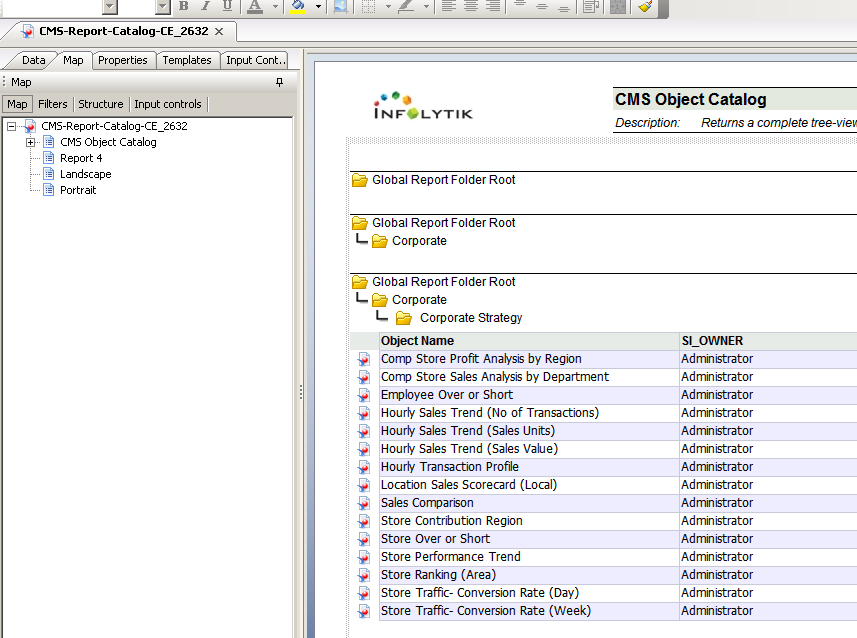
I’ve attached some screens of three new reports that come packaged with the current version (2.6.3.2) that provide Universe-Report-Connection relationships as well as a Reports Inventory screenshot that fully categorizes your CMS reports catalog by Folder.
One of the most interesting features about it is its ability to section all your data across folders hierarchically - the same as you’d natively see it via the CMC - as sections (or PDF bookmarks).
You can download it (yes, it’s free) from my signature.
I am trying to understand the above query
“SELECT TOP 10000 si_id, si_name,SI_AUTHOR,SI_LAST_RUN_TIME,SI_PARENTID, SI_ISTANCE from ci_appobjects,
ci_infoobjects where PARENTS(“SI_NAME=‘Webi-Universe’”, “SI_NAME=‘NAME_OF_THE_UNIVERSE’”)” on how is it built.
Are we joining thr two tables ci_appobjects and ci_infoobjects here? If yes, on what condition are we joining them?
Also I dont see SI_LAST_RUN_TIME, SI_ISTANCE in the output. I only see SI_PARENTID,si_id, si_name,SI_AUTHOR in the output.
Why are the other two missing? Please help
The query builder language is “SQL-ish”; not all of the regular SQL rules apply. When you see two tables in the FROM clause, it just means that both tables will be evaluated in the WHERE clause (think of it more like a union than a join). This particular query is pulling WebI reports by Universe – universes are stored in ci_appobjects and reports are in ci_infoobjects, so both tables are required for the query to function.
To illustrate further, consider this simple query:
SELECT si_name
 FROM ci_infoobjects,ci_appobjects
This will give you a single list of the names of all reports, folders, universes, and connections.
Regarding why you may not see a field in the output – si_istance should be si_instance. si_last_run_time should show up, but only for reports that are not instances.
Thank you so much for the reply Joe.
And what does TOP 10000 signify? Does it display only 10000 rows if there are more than 10000 in database?
And also is that in the database order? On what basic does it consider top 10000? Is it for the first 10000 reports on the universe?
Thank you Joe.
I haev another question in Query Builder.
I see that there are two sections in Query builder:
One is for submit Query (I have been using this to query)
Building a Query Statement Step-by-Step (Choose selection criteria, Specify the relationship between the rules and Choose the attributes that are to be returned.)
When do we use the second step? Is it when we are not sure of the SQL syntax in the first step? or is it used along with the first one?
That section is used when you are not familiar with the query syntax. It’s pretty useless in my opinion so I would just stick with the top part and type your query directly.
Thank you very much for the information above. One quick question though. Do we know what could be the max number of records that we can pull form Query Builder using the top xxx cmd?
 (BOB member since 2008-03-26)
 (BOB member since 2007-10-05)
 (BOB member since 2007-10-23)