Applying subtotals when there are multiple dimension values

Hi All,

We are on BO 4.1 SP03 environment

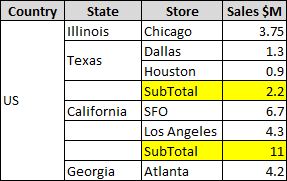
I need to add subtotals for a measure when ever there are multiple values in a dimension, attached the screenshot for the required outcome

The pic is just a reference, not actual data. I need to add subtotal on sales column only when there is more than 1 store in a state. Ex: As per the screenshot, Illinois & Georgia states have only 1 store subtotal is not required, where as Texas & california have more than one so Subtotal is required

Can I know your expertise in proposing a solution to the client for this requirement

Thanks in advance

Thanks,
Sri
Subtotals.JPG


srit (BOB member since 2013-07-11)

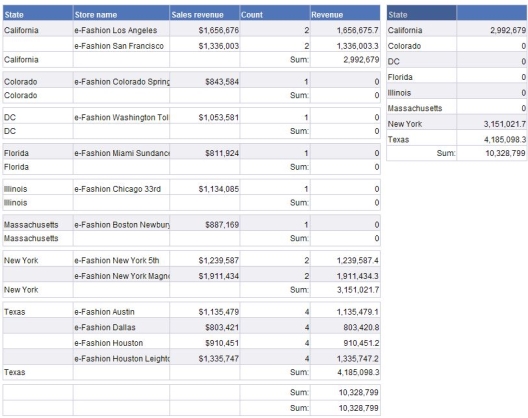
Here’s an example using E-Fashion sales data for 2006.

We can derive a count of Stores in each State using:

=Count([Store name]) In ([State])

…and we can return the Sales Revenue conditionally with:

=If Count([Store name]) In ([State])>1 Then [Sales revenue] Else 0

…which we can then sum. See the attached pic for illustration.

Oh, and welcome to B:mrgreen:B :smiley:

HTH

NMG
Count.JPG


mcnelson :uk: (BOB member since 2008-10-09)

Its better to use one of the best feature “Break” which is provided in Webby.
Manipulate properties indeed.

:wave:


PathFinder :india: (BOB member since 2012-01-05)

How would you accomplish this request using a break?

NMG


mcnelson :uk: (BOB member since 2008-10-09)

Thanks for your reply nelson

Just wondering, if there is a way to not show the break footer when the state has only 1 store

Thanks


srit (BOB member since 2013-07-11)

I’m unaware of any mechanism to conditionally show / hide break headers or footers in XI3.x. You could probably approximate it with additional rows and conditionally hiding these. It may well be possible, but I can’t think of a way off the top of my head.

NMG


mcnelson :uk: (BOB member since 2008-10-09)

mcnelson,

It is easy you have to go with order for which you are looking for,
e.g. if we consider mentioned format we require two breaks

  1. Country 2. State
    Also, We have to set below properties to get exact mentioned outcome as
    Country Header & Footer = Hide
    State Header = Hide
    Table Header = Show

Hope this will Help

:wave:


PathFinder :india: (BOB member since 2012-01-05)

@Pathfinder: How does your method determine whether to hide or show the footer when there is only a single dimension in the break, as per the OP request?

NMG


mcnelson :uk: (BOB member since 2008-10-09)

Not even possible with the hiding functionalities in 4x.


Mak 1 :uk: (BOB member since 2005-01-06)

Apologize to correct you,but I have successfully done this many times.


PathFinder :india: (BOB member since 2012-01-05)

No need to apologise :rotf:.

OK, well teach me something :stuck_out_tongue: .

How do you hide the footer when there is only one row shown, by a singular dimension, in the break, so you dont get two rows with the same data? The other sections, with more than one dimension listed, need to display the footer as normal.
This is as per the OPs original question.

Mak 1 :uk: (BOB member since 2005-01-06)

Thanks…:mrgreen:

Let’s take mentioned ex. we have to use two breaks in sequence i.e. for country and then state…

first We have to select country to set its go to break properties and uncheck display header and footer

then for state uncheck header

and we have to select table and set its property to display header.

That’s all :slight_smile:

:wave:


PathFinder :india: (BOB member since 2012-01-05)

Please can you re-read the original question?

The break footer needs to be hidden where there is only one store in that break. This is not possible in 4.1 SP3

You can set the footer contents to not show but the footer row cannot itself be hidden.

fine… :smiley:

I got it…
you can use filter on footer row values can be invisible in case store=1 :frowning:

am i right?


PathFinder :india: (BOB member since 2012-01-05)

No, even easier:
=If(Count([Store])>1;“Subtotal”)
=If(Count([Store])>1;Sum([Sales]))

Don’t need a calculation context as they are in the context of the State break. 8)